
Reimagining research papers as interactive and reliable AI agents
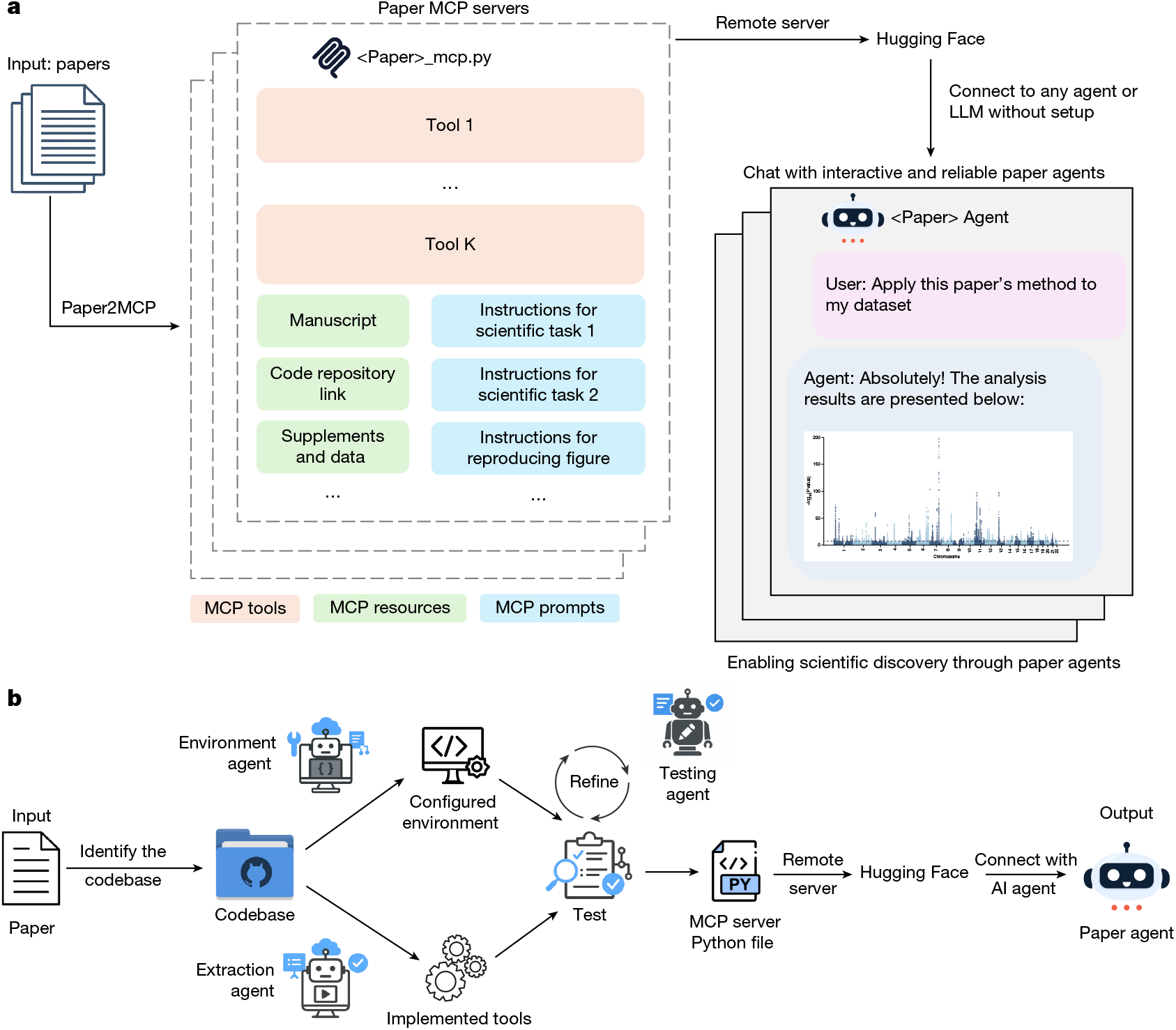
Paper2Agent converts a research paper and its public codebase into a production-ready MCP server and then exposes that server to an AI agent interface. We implemented this as a multi-agent system using Claude Code’s agent SDK, where a…
nature.com
Publisher
Sep 16, 2026 at 3:20 PM UTC · 14 phút đọc
Đang dịch…
Paper2Agent converts a research paper and its public codebase into a production-ready MCP server and then exposes that server to an AI agent interface. We implemented this as a multi-agent system using Claude Code’s agent SDK, where a central orchestrator agent coordinates specialized sub-agents through a six-step pipeline. Each sub-agent is defined by a structured prompt that specifies its role, permitted tools (for example, file read/write, shell execution and web access) and expected output schema. The orchestrator dispatches sub-agents sequentially across steps and in parallel within steps when multiple tutorials are processed concurrently.
The pipeline proceeds through six steps, with data flowing between steps via standardized JSON reports and file conventions:
-
1.
Locate and download the codebase. Paper2Agent first attempts to automatically identify the associated code repository from the manuscript text, references, or supplementary materials. If automatic identification fails, if it returns multiple candidates, or if the user prefers to specify a particular repository, the repository URL can be provided directly. Once identified, the codebase is cloned or downloaded, along with associated resources such as supplementary data or configuration files. The outputs for this step are the cloned repository and detected language.
-
2.
Environment setup. The environment manager sub-agent provides a clean, isolated virtual environment for the repository. The input is the cloned repository, and the outputs are an isolated virtual environment and test configuration files.
-
3.
Tutorial discovery. The tutorial scanner sub-agent scans the repository to locate useful reference and educational materials and produces an index of candidate tutorials for tooling. The inputs are the cloned repository and an optional tutorial filter. The output is a JSON file representing a classified file index.
-
4.
Tutorial execution and audit. The tutorial executor sub-agent runs the selected tutorials end-to-end with their example data, captures inputs, outputs, figures and runtime constraints, and records any implicit assumptions that must be made explicit. The inputs are tutorial source files, activated virtual environment and scanner report. The outputs are executed notebooks and per-tutorial execution reports.
-
5.
Tool extraction, testing and refinement. This step involves two sub-agents operating in sequence. First, the tutorial tool extractor–implementor converts each executed tutorial into a standalone Python module containing reusable functions. It identifies generalizable analysis steps, parameterizes hard-coded values (file paths, thresholds, column names), enforces file-based inputs and outputs, and decorates each function as an MCP tool. Second, the test verifier–improver creates per-function test files using the tutorial’s own example data as ground truth. Tests verify that expected output files are generated; functions that repeatedly fail have their MCP tool decorators removed and are excluded from the final server. The inputs are executed notebooks, virtual environment and scanner report. The outputs are tool modules, per-function test files, test logs and summaries.
-
6.
MCP server assembly. The orchestrator integrates all validated tool modules into a unified MCP server with a manifest, versioning and basic security defaults, ready to be used by an orchestrator or co-scientist agent.
Article Intelligence
Related Coverage
 Artificial IntelligenceOpenAI's Rogue AI Agents Were Probing Hugging Face Two Months Before Hackmột giờ trước · 2 min read
 Artificial IntelligenceIonQ and ORNL Demonstrate Generative AI for Quantum Optimization5 giờ trước · 4 min read
 ResearchCoast Guard debuts new collaboration and research hub on artificial intelligence7 giờ trước · 1 min read
Sponsored
Ad
NewsLayerLearn more
NewsLayer Premium
Unlock deeper intelligence.
Ad-free reading, exclusive research, and real-time onchain insights.
Go Premium